


How to Reverse TikTok
TikTok is a social media app that has innovative features. Through this app its users share videos. Videos shared from the platform are diverse and innovative in their concept, getting millions of likes and popularity around the world. TikTok is making millions of people popular around the world. The app is a huge source of entertainment for millions of people. It brings a smile to its users.
The Internet is facilitating TikTok users to make their videos more entertaining and unique. There are a number of online software that are helping TikTokers to make their work innovative. You can also reverse other people’s TikTok video by using certain features on the app but it is not something that every TikToker knows. By using the Reverse option in videos you can show the video content in the backward direction. It seems difficult but it is much easier to do so.
Anyone can “Reverse Video” by using this guideline we are providing here. On the internet, there are many other methods provided by different software and apps to make your video reverse. We mentioned some of the easiest ways and online software to get this done other than the TikTok app.
How to Reverse Other People’s Video on TikTok
- Start the TikTok app on your phone.
- Click on the “+” option on the app, it’s on you to either record a new video or selects from the previous video to implement the reverse effect on them.
- Play the video on your app.
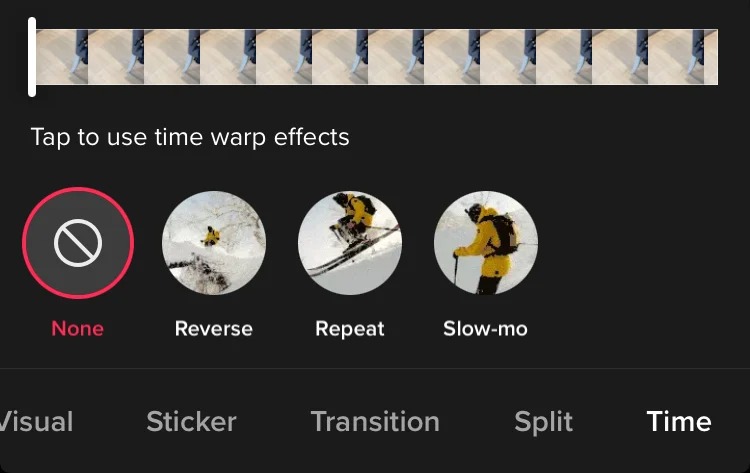
- Once you play it, on the bottom of the app there is an Effect option, tap on it. You will be given the option of “Reverse”, tap on it.
- The video will be played backwards.
- To save the file in reverse Effect, tap the save option first and then share it on your TikTok profile.
- Through this effect you can also reverse other people’s videos on TikTok.
Bee Cut Video Editor
When it comes to video editing there are many apps on the internet these days but only some have good quality and perfect features. Bee Cut is one of the best video editing apps, it has features like preview, media, and timeline. This app is not restricted only to the TikTok app; you can also edit and watch the video on a bigger screen. The app also includes other features that make your video perfect and amazing. The features include elements, filters, and overlay, etc. you can trim the video on the app and also set your desired timeline for your videos.
By following steps you can also Reverse your video through the Bee Cut Video editor.
- First, download the video on your device.
- From the media panel, import the video and drag it on your timeline.
- Double click on the video, another window will appear, a reverse option will be shown to you. Select the Reverse option and click “ok”.
- The reverse effect will be applied to the video instantly.
- To make a video more amazing, use other features to edit it.
- Once you edit the video according to your choice. Tap on Export and select in which format you want to save your file. Once again tap on export to save it on your desired destination folder that you have selected.
- Now upload the video on your TikTok account from your destination folder.
The app will help you easily share your videos in reverse effect with your followers.
Kapwing Online Video Editing Software
If you want to use Kapwing, you can use it online rather than downloading it on your phone. Visit their website. It is very popular and widely used due to its quality functions in video making, reversing video and adding filters, etc.
Follow the following step if you want to use the online software.
- Go to the Kapwing reverse video page.
- First load the video on the page on which you want to make a reverse effect or want to add any other feature on the website.
- You can add video from your mobile phone or computer.
- Once you have uploaded the video, now you will be given a reverse speed option from which you can select the desired speed for your video.
- If you want to trim the video or watermark, an option is given to you. Edit the video according to your requirement.
- Tap on the Create button and save the video.
- Lastly, share it on your TikTok profile.
By following the above-mentioned method you will be able to reverse other people’s TikTok videos. It is the easiest way to reverse the video. This software will help you create amazing videos.
Take a Look at This to Explore the Top Discounts Available For: Nexus